Financial Operations

Billing that matches the complexity of your operation

Shipper billing, LMC rate cards, automated least-cost analysis, and margin-based rate card generation — one integrated module from carrier tariff to client invoice.
95% Fewer billing disputes
80% Faster month-end close
0 Manual rate lookups
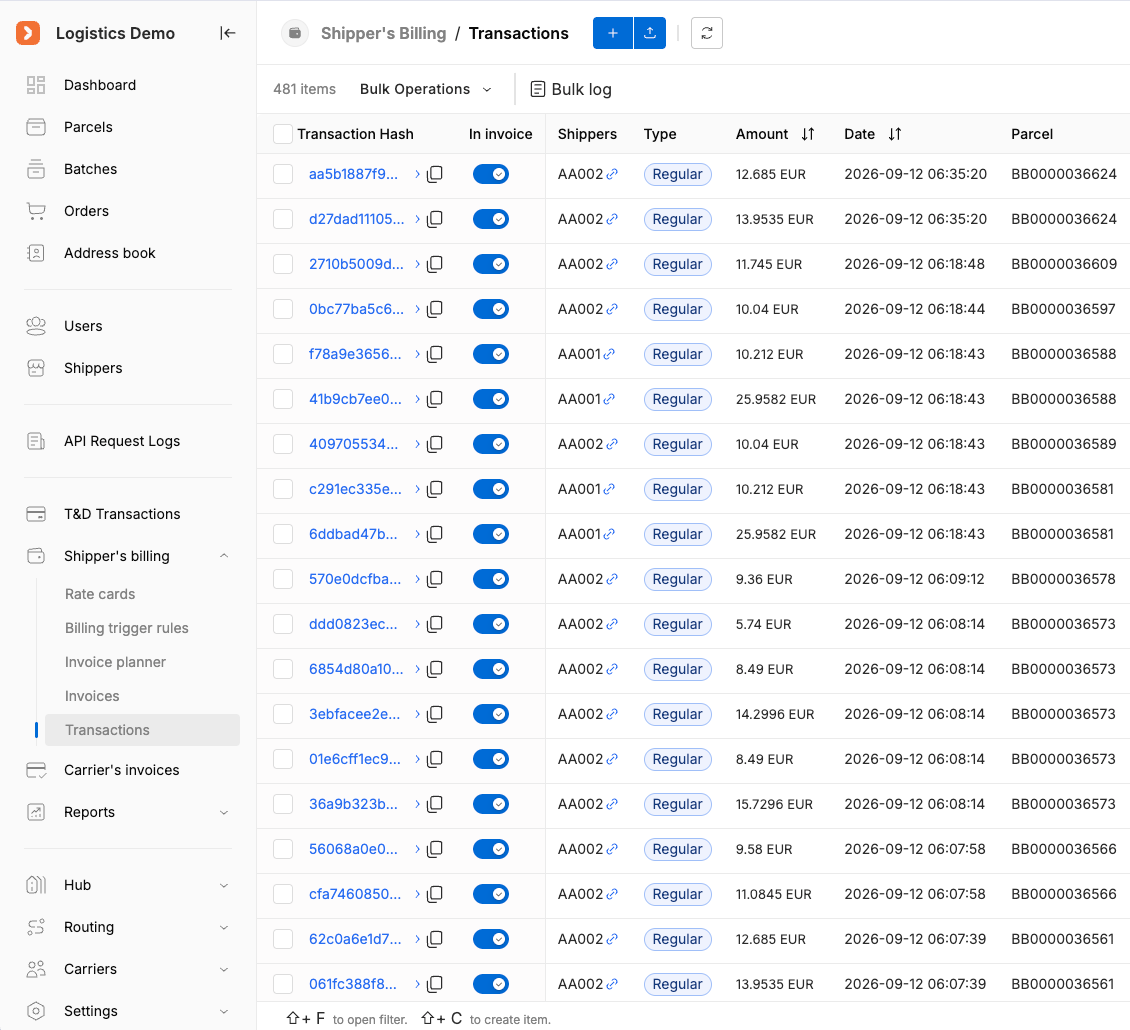
The V-TER Ship Billing transaction ledger: each charge with its amount, parcel and the rate card version it was calculated from.
What It Covers

Two billing layers,
one unified module.

V-TER Ship Billing combines standard shipper billing with a fully integrated Least Cost Routing engine — designed for operators who need transactional accuracy and carrier rate intelligence in the same system.

Layer 1
Built-in Shipper Billing
The core billing foundation: rate cards tied to carrier solutions, automatic transaction creation per parcel, and a complete financial record for every shipment event. Multi-dimensional matching criteria mean the right rate is applied every time — without manual lookup.
  • Rate cards with multi-dimensional matching criteria
  • Automatic transaction generation on parcel creation — zero manual entry
  • Warning system for overlapping rate card criteria
  • Transaction records feeding directly into operational reports
  • Multi-party billing across clients, carriers, and warehouses
Layer 2
LMC Rate Cards & Least Cost Engine
Beyond billing records — a rate intelligence layer that finds the most cost-efficient carrier solution for any weight and destination, then converts that data into client-facing rate cards. Carrier cost data becomes client pricing, with full traceability at every step.
  • LMC rate cards linked to specific carrier solutions and criteria
  • Automated least-cost analysis across selected rate cards
  • Generated Least Cost Data tables per weight and country
  • Margin and surcharge application to produce final rate cards
  • Approval flow with version control and read-only lock
  • Approved rate cards reusable as standard shipper billing rates
How It Works

From carrier tariffs to client rates —
end to end.

A single linear workflow: ingest carrier rates, run the analysis, apply margin, get approval, deploy. No re-entry, no export/import friction between stages.

Step 1
Create LMC Rate Cards
Define rate cards linked to specific carrier solutions. Each LMC Rate Card extends the standard rate card structure with four additional carrier-level matching criteria: Shipping Solution, Package Type, Incoterm, and IOSS scheme. Overlap warnings flag conflicts without blocking creation.
Step 2
Run Least Cost Analysis
Select the criteria that apply to your scenario — this narrows the list of eligible rate cards. Then select multiple rate cards for comparison via multiselect. The system runs a background job that compares all selected carrier options and identifies the optimal match per weight band and destination country.
Background job: The analysis runs asynchronously — you can continue working while the system processes the comparison across all selected rate cards. Results appear on the Least Cost entity page via "Show Data".
Step 3
Review Least Cost Data
The generated table shows the optimal carrier match for every weight and country combination in the analysis scope. The full table is downloadable as CSV at any point — for finance team review, external sign-off, or ERP ingestion.
Step 4
Apply Margin & Surcharges
Build a Least Cost Rate Card from the generated data. Add a percentage margin on top of base rates, layer on conditional surcharges, and generate a final rate card version. This is where carrier cost data becomes client-ready pricing — computed automatically, not built manually row by row.
  • Margin — percentage applied uniformly or by condition to every base rate
  • Surcharges — configurable by zone, package type, weight band, and more
  • System generates a new Customer Rate Card Version with fully computed final rates
Step 5
Approve & Lock
Each Least Cost Rate Card maintains a full version history. When a version is approved, the entire Rate Card — all versions — enters read-only mode. This is a hard lock, not a soft flag. Pricing data that is live cannot be silently modified.
Version control: Any existing version can be duplicated as the starting point for a new version. Multiple versions can exist and be edited independently until the approval lock is applied.
Step 6
Deploy — back into Billing & Routing
Approved Least Cost Rate Card Versions don't stay siloed. Once approved, they can be promoted directly into the standard billing system as a Shipper Rate Card Version, or added to the Least Cost routing list and used as a Routing Rule — no re-entry, no copy/paste.
  • Import approved version as a standard Shipper Rate Card Version
  • Add approved version to the Least Cost routing list as a Routing Rule
  • Single unbroken workflow: calculate → build → approve → deploy
System Safeguards

Built-in guardrails for
accurate, conflict-free billing.

Hard controls protect pricing integrity — not advisory warnings, but enforced system behaviour that prevents billing errors before they reach clients.

Safeguard 1
Overlap Warning System
When a new LMC Rate Card is created with criteria that overlap an existing one, the system immediately flags both cards with a warning — without blocking the operation. Teams stay informed of conflicts without losing flexibility. Parallel rate cards can be intentionally kept if needed, but the overlap is always visible.
Safeguard 2
Approval Lock & Read-Only Mode
Once a Least Cost Rate Card Version is approved, the entire Rate Card — all its versions — enters read-only mode. This is enforced at the system level. Pricing data that is live cannot be silently modified. Any changes require creating a new version, preserving a clear and complete audit trail of every pricing decision.
Safeguard 3
CSV Export at every step
Least Cost Data tables and Least Cost Rate Card Versions are both exportable to CSV at any point in the workflow. Finance teams, external reviewers, or ERP integrations can consume the data without needing access to the billing platform — keeping the approval workflow internal while making the outputs widely shareable.
Who It's For

Built for how logistics
billing actually works.

Operations where manual rate comparison is a bottleneck, where multiple clients need distinct pricing from the same carrier base, or where approved rates must be locked and auditable.

Cross-border Shippers
Operations routing across multiple carriers with DDP/DAP splits and country-by-country rate variation
Managing incoterms, IOSS complexity, and variable carrier rates across dozens of destination countries is exactly the scenario the LMC engine is built for. Define the criteria once, run the analysis, and get the optimal match per weight and country — without spreadsheets.
3PLs & Fulfillment Hubs
Multi-client environments where each shipper needs distinct rate cards from the same carrier base data
The same Least Cost Data can generate multiple client-facing rate cards — each with different margin structures, surcharges, and approval states. No duplication of carrier tariff data, and each client's rates are independently locked on approval.
High-Volume E-commerce
Teams sending thousands of parcels per day across variable weight bands where manual rate comparison is not scalable
Automatic transaction creation on every parcel, with the right rate applied based on matching criteria — no manual rate lookup, no billing backlog, and a full audit trail for every parcel transaction across every weight band and destination.
Carriers Managing Client Contracts
Carrier-side teams generating pricing proposals from cost data with controlled margin
Build pricing proposals directly from your carrier economics — add margin, layer surcharges, generate a rate card version. When approved, the rate card locks automatically and can be deployed as a live shipper billing rate or routing rule. The full proposal-to-deployment cycle without external tooling.
FAQ

Common questions

You upload each carrier's rate card — flat rates, weight breaks, zone tables, or surcharges. For every shipment, the engine evaluates all eligible carriers in real time and selects the lowest total landed cost. You set margin floors per lane to ensure a minimum per-parcel profit.

Yes. Margin logic is configurable at carrier level, lane level, or client level. You can apply a flat margin, a percentage, or a tiered rule based on weight or volume. Rules layer — so a lane-level override can sit on top of a carrier-level default.

Rate cards are uploaded directly in the admin panel — Excel or CSV. The system versions each upload so you can compare old vs. new rates before activating. Scheduled rate changes (e.g., new year surcharges) can be queued to go live automatically.

Yes. The reporting module lets you slice billing data by client, carrier, destination, date range, or shipment type. Reports export to CSV or PDF and can be scheduled for automatic delivery to your finance team.

Stop comparing carrier rates in spreadsheets

Let the system find the least-cost route automatically.

Show us your rate card structure and we'll walk through exactly how V-TER Ship Billing handles your carrier mix, margin logic, and approval workflow.